Skip to content
For International Medical Graduates

Practice for the NAC OSCE.

Fit a station into your study day, even without a study partner. Talk to an AI patient by voice or text, then use structured feedback to decide what to practise next.

Start free with up to 3 AI patients — 1 per day, subject to capacity. No card required. Your daily Free study pools also include 20 Questions, 20 Flashcards, 20 Skill Questions and 20 Skill Flashcards.

Also preparing for the MCCQE? Explore questions, mock tests and flashcards →

A closer look at your next practice
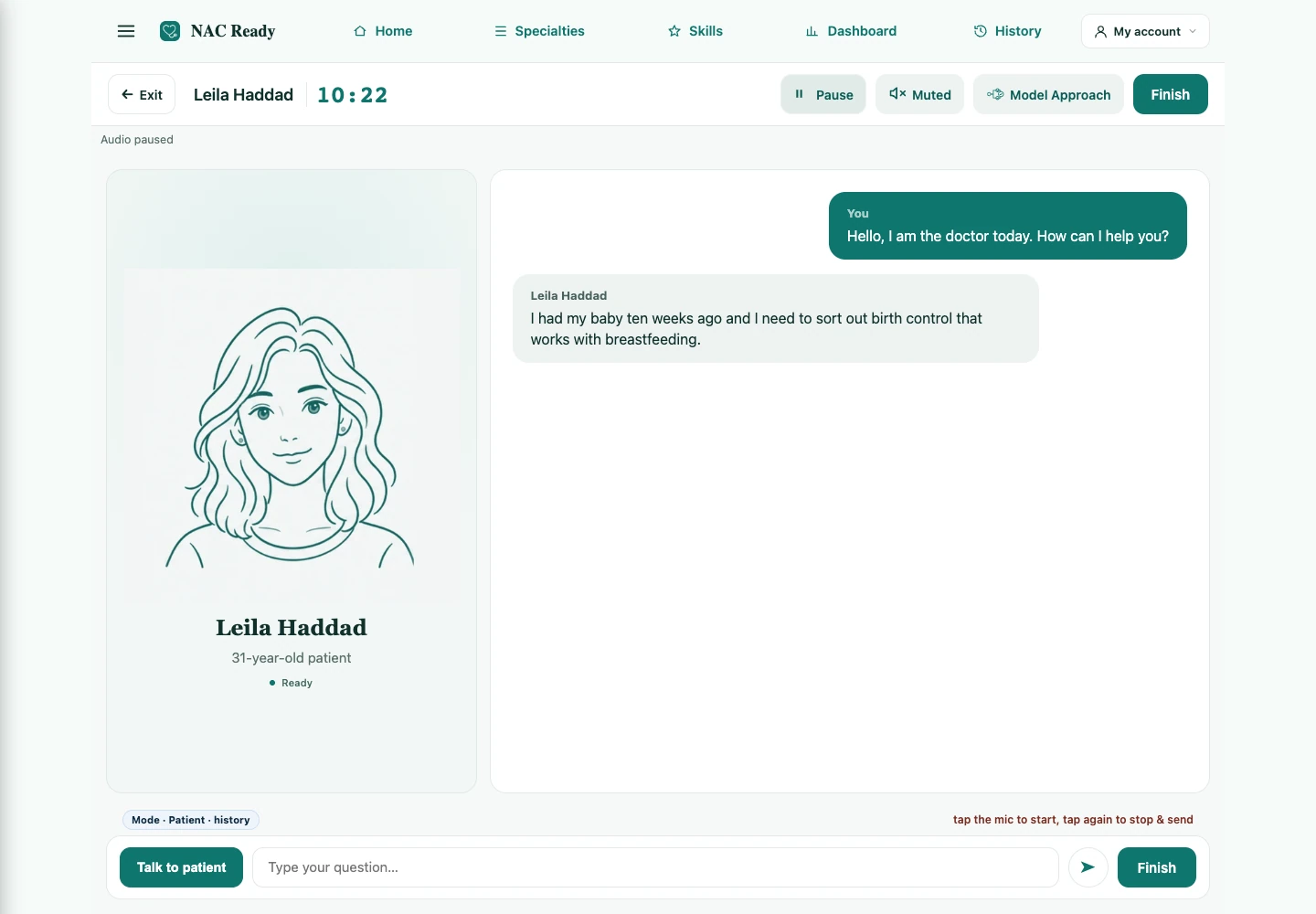
Current AI patient interface with the patient avatar, conversation, station timer and voice or text controls.
Actual interface · illustrative practice data.Enlarge screenshot

How it works

One station, three steps. Make time for focused practice between classes.

  1. Read the brief

    Choose a station and read the candidate instructions before starting the timer.

  2. Practise with the patient

    Ask questions, explore concerns and explain your plan by voice or text. Work on your pacing as you go.

  3. Review your feedback

    Finish the encounter, review your strengths and gaps, then choose one priority for your next practice.

Inside NAC Ready

Build your NAC OSCE practice routine

Rehearse the conversation, manage your time and use your feedback to choose what to practise next.

Scroll to explore
01 / 14 specialties · 150+ topics

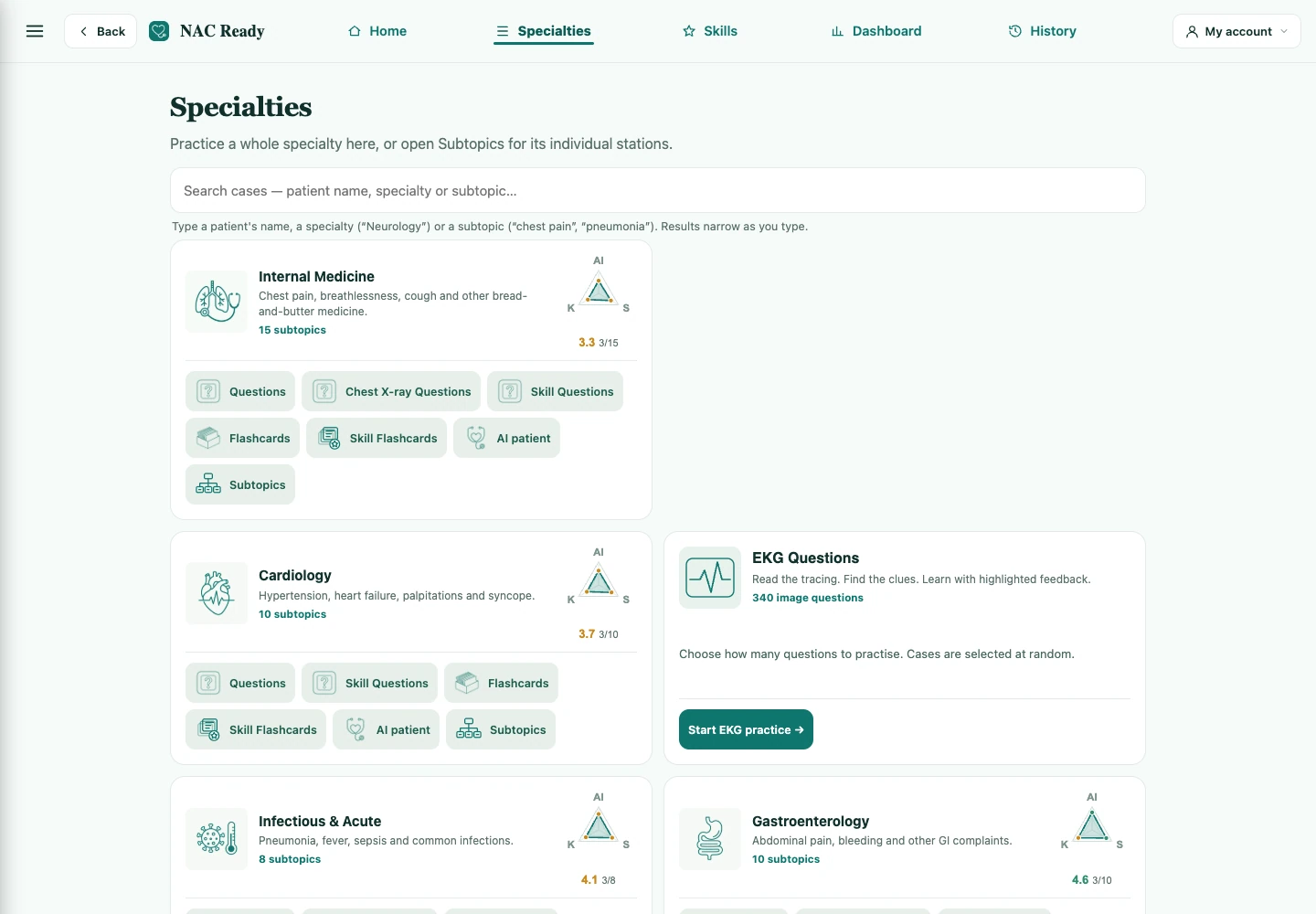
Find your focus.

Pneumonia & fever, chest pain, headache, diabetes, stroke/TIA, pediatrics, OB/GYN, psychiatry, ethics & counselling, and more.

  • Open questions, flashcards, AI patients or individual subtopics.
  • Practice clinical knowledge and NAC skills in one place.
Current Specialties screen with subject cards and actions for questions, flashcards and AI patients.
Actual interface · illustrative practice data.Enlarge screenshot
02 / Realistic 11-minute timer

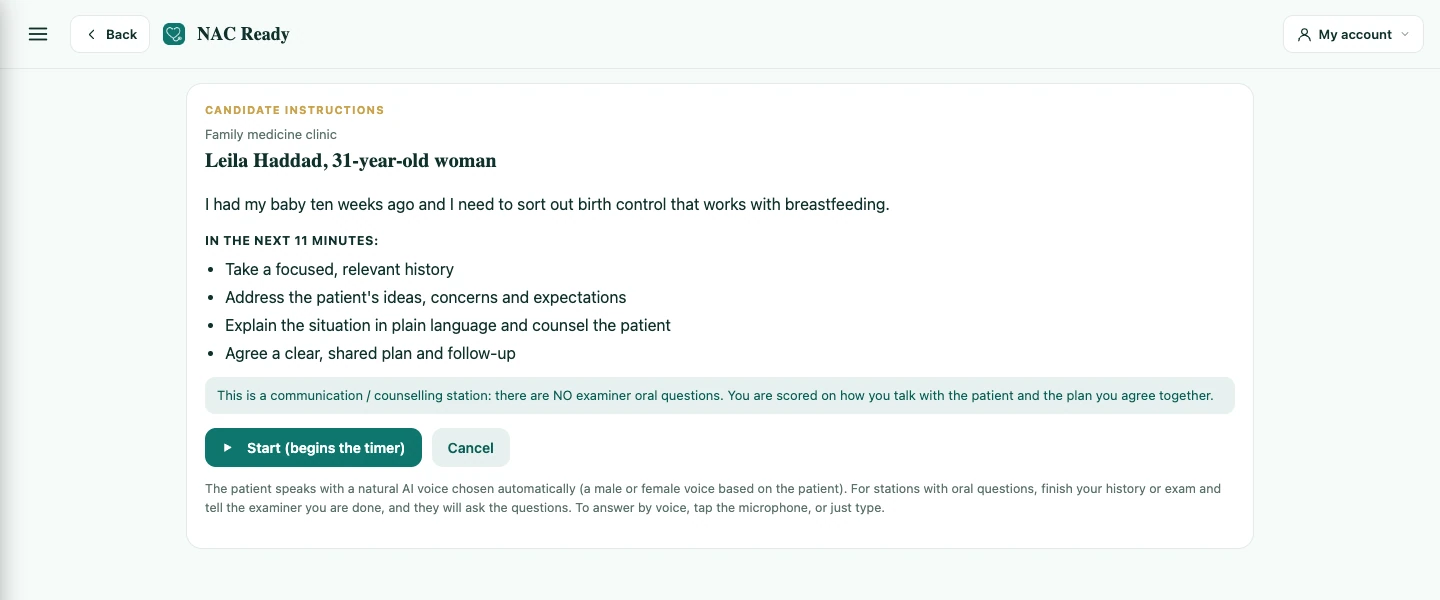
Start with a clear plan.

Choose a station and read the candidate instructions before starting the timer. Build your pacing and a calm wrap-up. Stations with examiner oral questions are supported too.

  • Read the task before the encounter.
  • Pause, resume and practise your pacing.
Current candidate instructions and controls for an eleven-minute AI patient station.
Actual interface · illustrative practice data.Enlarge screenshot
03 / AI standardized patient

A patient. A conversation.
Your next practice.

Practise taking a focused history, exploring concerns and explaining your plan in a simulated clinical encounter. Use voice or text.

  • Ask questions, explore concerns and explain your plan.
  • Follow the conversation alongside the patient avatar.
Current AI patient interface with the patient avatar, conversation, station timer and voice or text controls.
Actual interface · illustrative practice data.Enlarge screenshot
04 / Structured practice feedback

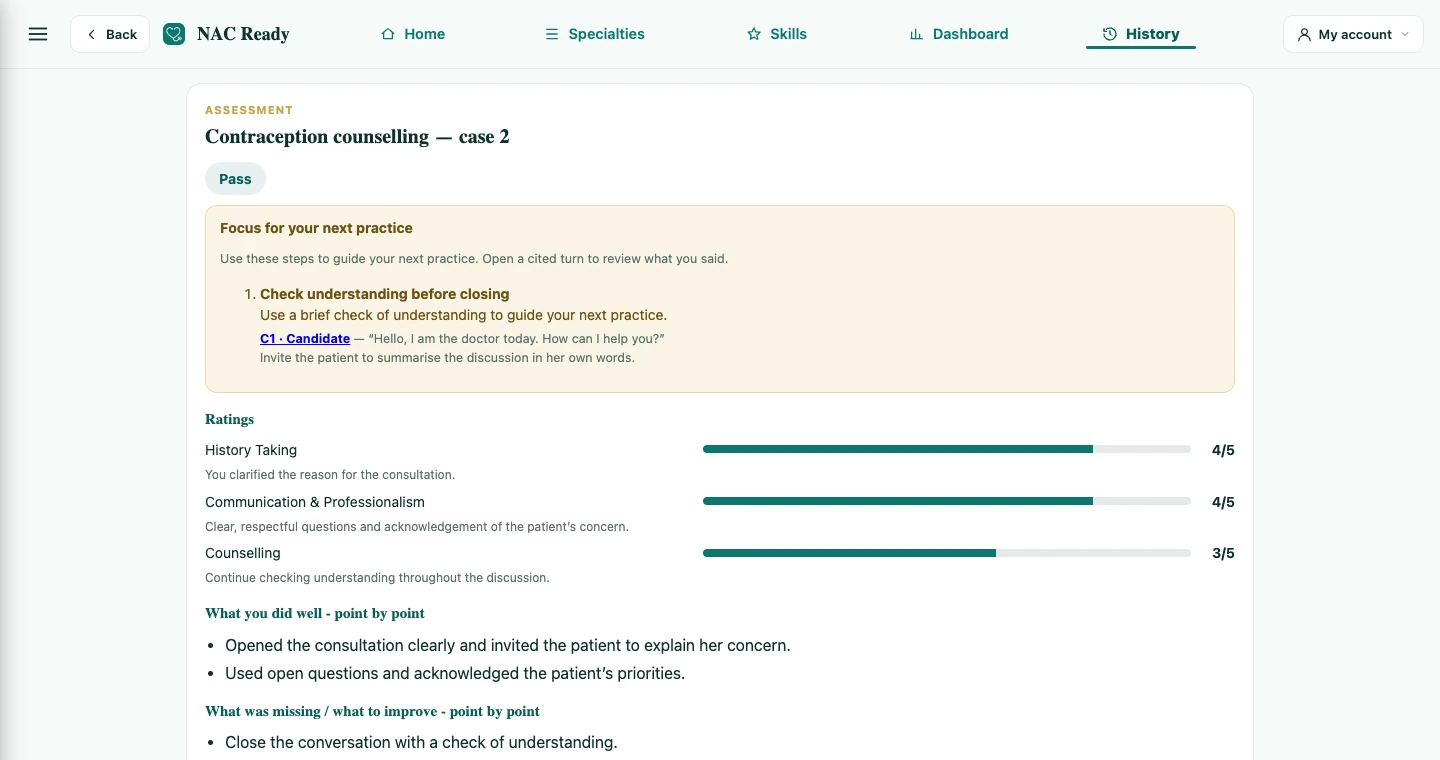
Make each attempt count.

Review scores by domain, what you covered, what you missed and priorities for your next attempt. Feedback is AI-generated practice guidance.

  • Ratings, consultation checklist and model approach.
  • Choose one priority for your next practice.
Current Assessment screen with practice ratings, strengths, gaps and a consultation checklist.
Actual interface · illustrative practice data.Enlarge screenshot
05 / MCCQE-style questions

Think it through.
Then make your choice.

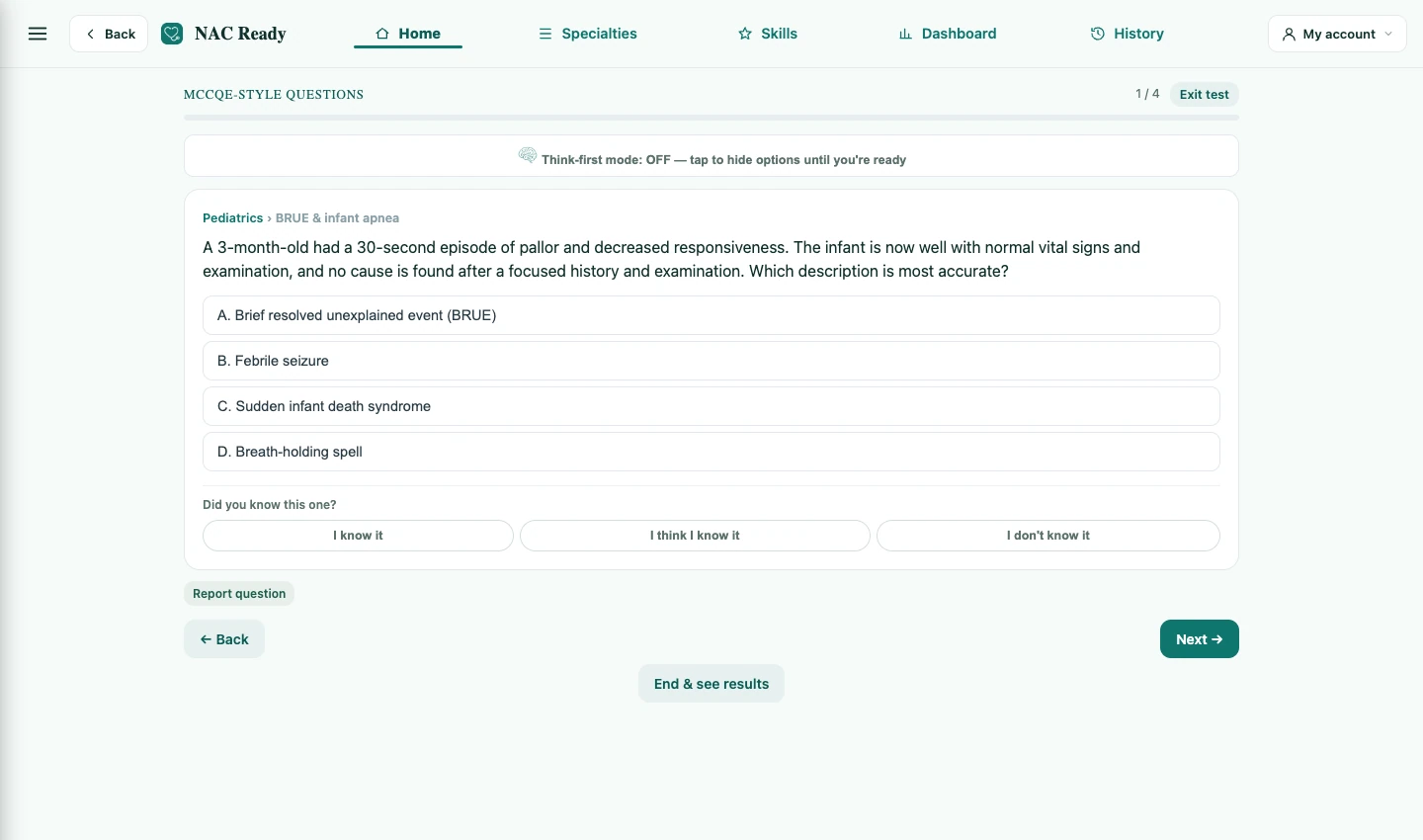
Practice single-best-answer questions by topic and apply clinical reasoning before revealing the answer.

  • Think-first mode keeps the options hidden until you are ready.
  • Rate your confidence and review the explanation.
Current MCCQE question screen with single-best-answer options, Think-first mode and confidence controls.
Actual interface · illustrative practice data.Enlarge screenshot
06 / MCCQE-style mock tests

Make time for a deeper session.

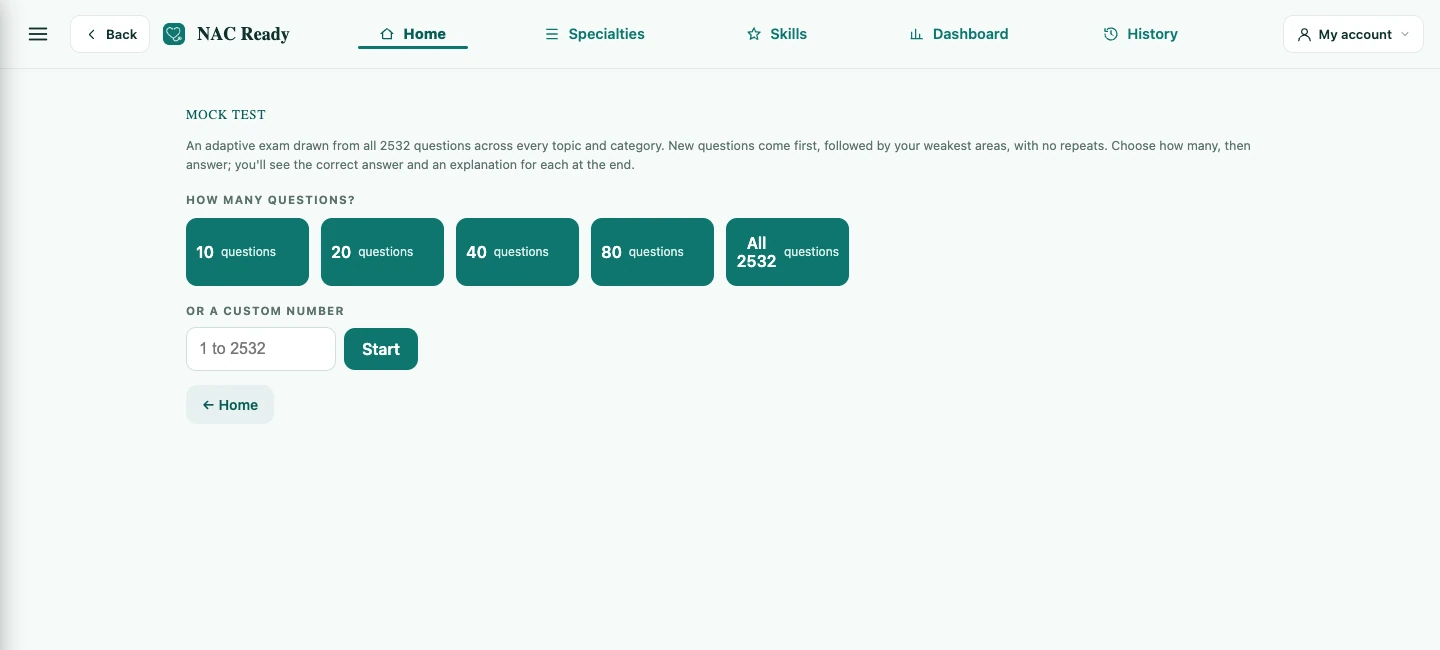
Single-best-answer questions with explanations. Build a mock test or drill by topic — with a "think-first" mode that hides the options until you're ready, and your results saved to your dashboard.

  • Choose your question count or enter a custom length.
  • Prioritise unseen questions and weaker areas.
Current Mock Test setup showing question-count choices and adaptive selection.
Actual interface · illustrative practice data.Enlarge screenshot
07 / Study flashcards

Recall it. Revisit it.
Make it stick.

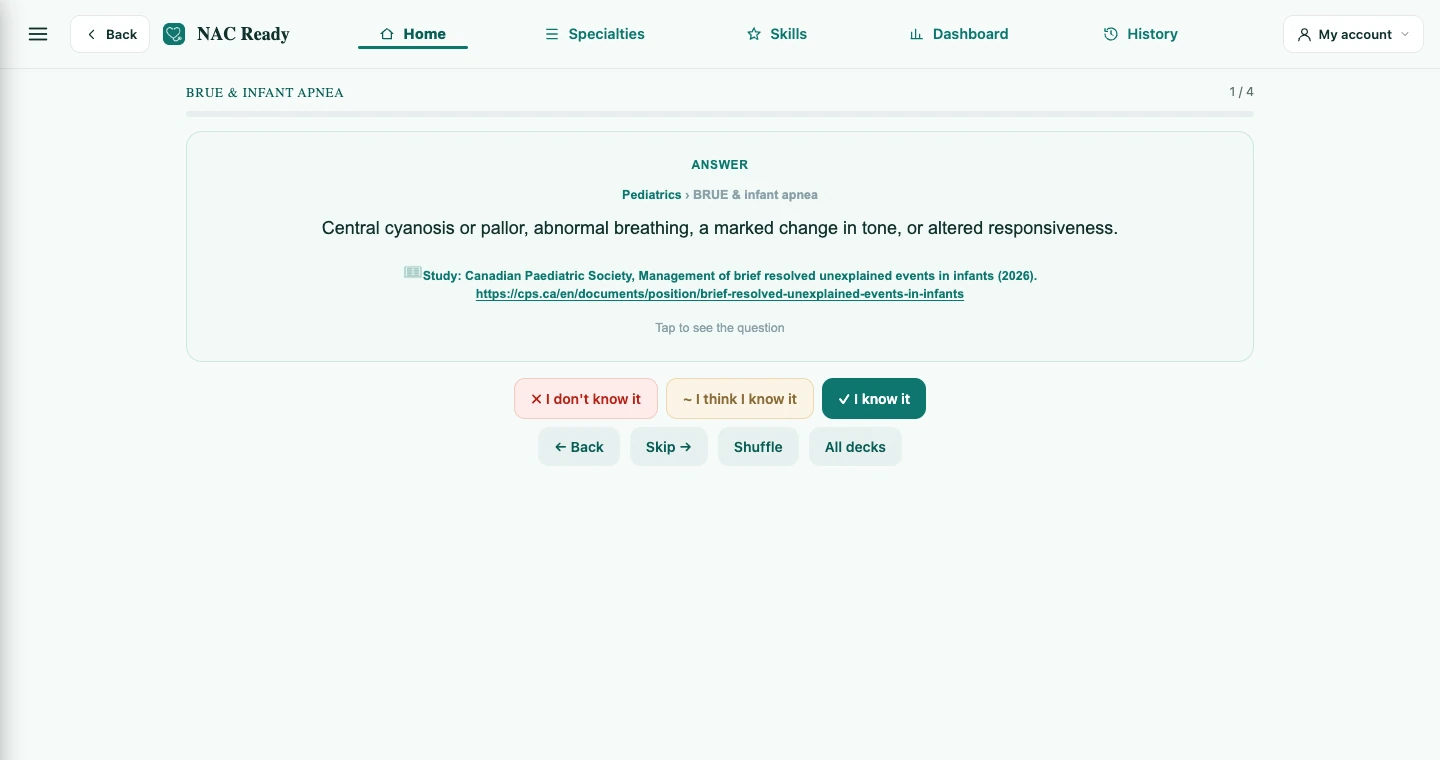
Thousands of high-yield flashcards across every topic, each with a "where to study" reference. Track what you know and review your weak cards.

  • Reveal the answer and follow the study reference.
  • Record your confidence and return to weak cards.
Current flashcard screen showing the revealed answer, study reference and confidence ratings.
Actual interface · illustrative practice data.Enlarge screenshot
08 / EKG Questions

Look closer.
Build your interpretation.

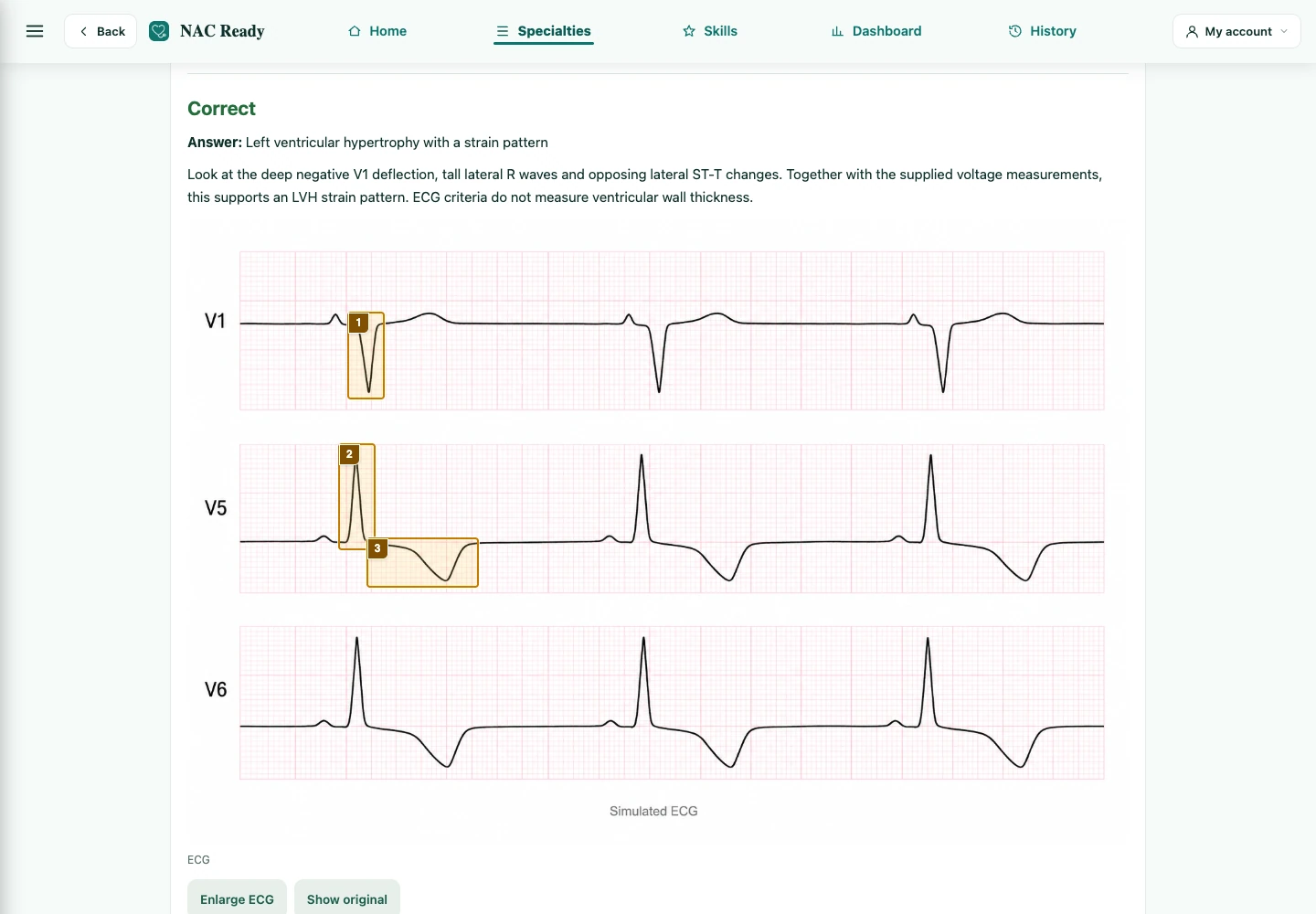
Practice reading EKGs with image-based questions. Choose an answer, then review the explanation and highlighted findings on the same image.

  • Choose a practice length and work through a varied set.
  • Zoom in to inspect the image.
Current EKG practice showing an educational tracing with highlighted findings and answer feedback.
Actual interface · simulated educational image.Enlarge screenshot
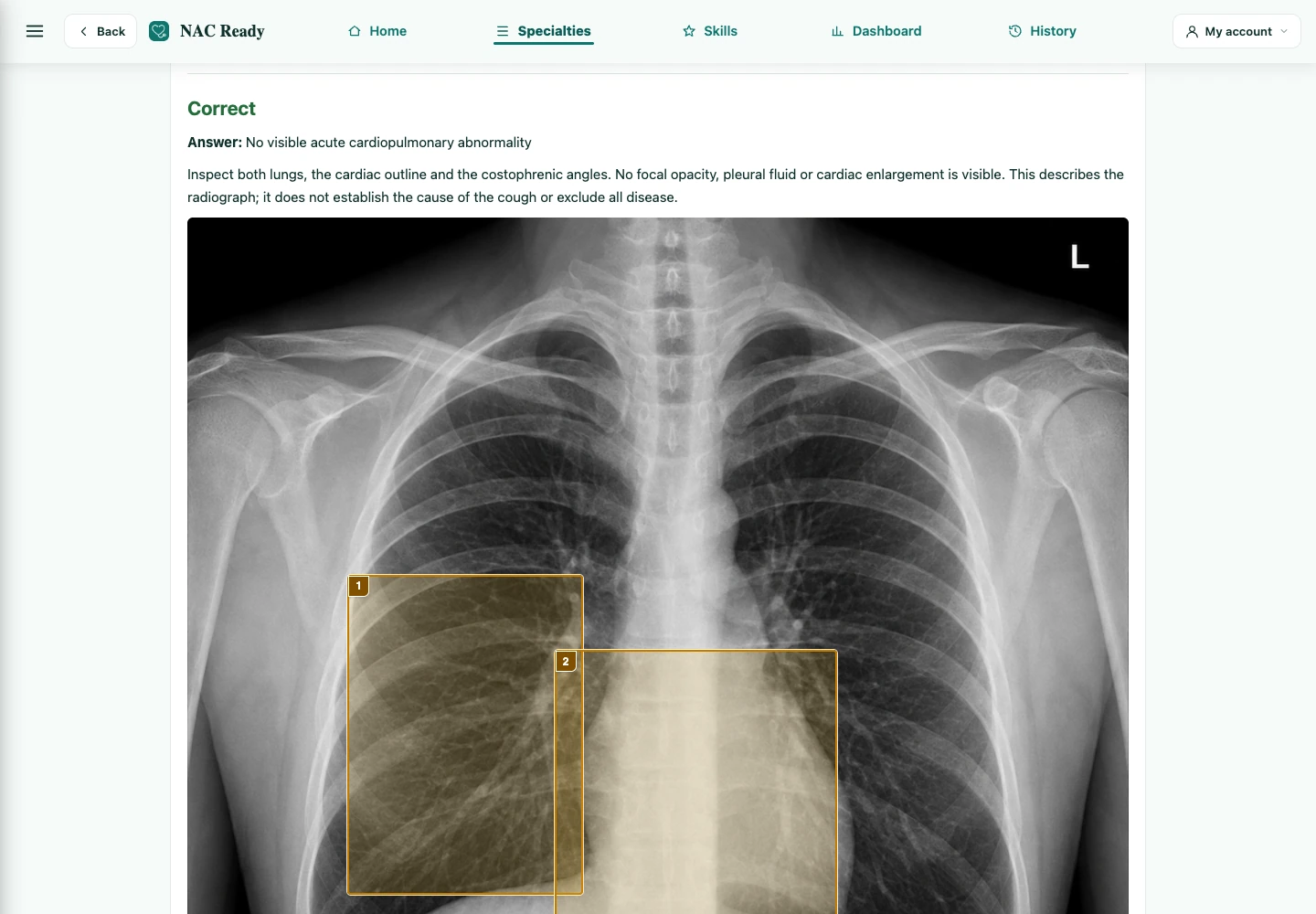
09 / Chest X-ray Questions

See the findings
in context.

Study chest X-rays through focused questions, annotated feedback and supporting references. Return to the original image whenever you want another look.

  • Compare the image with its explanation.
  • Optional NAC speaking prompts help you describe what you see.
Current Chest X-ray practice with an educational image, annotations and answer explanation.
Actual interface · simulated educational image.Enlarge screenshot
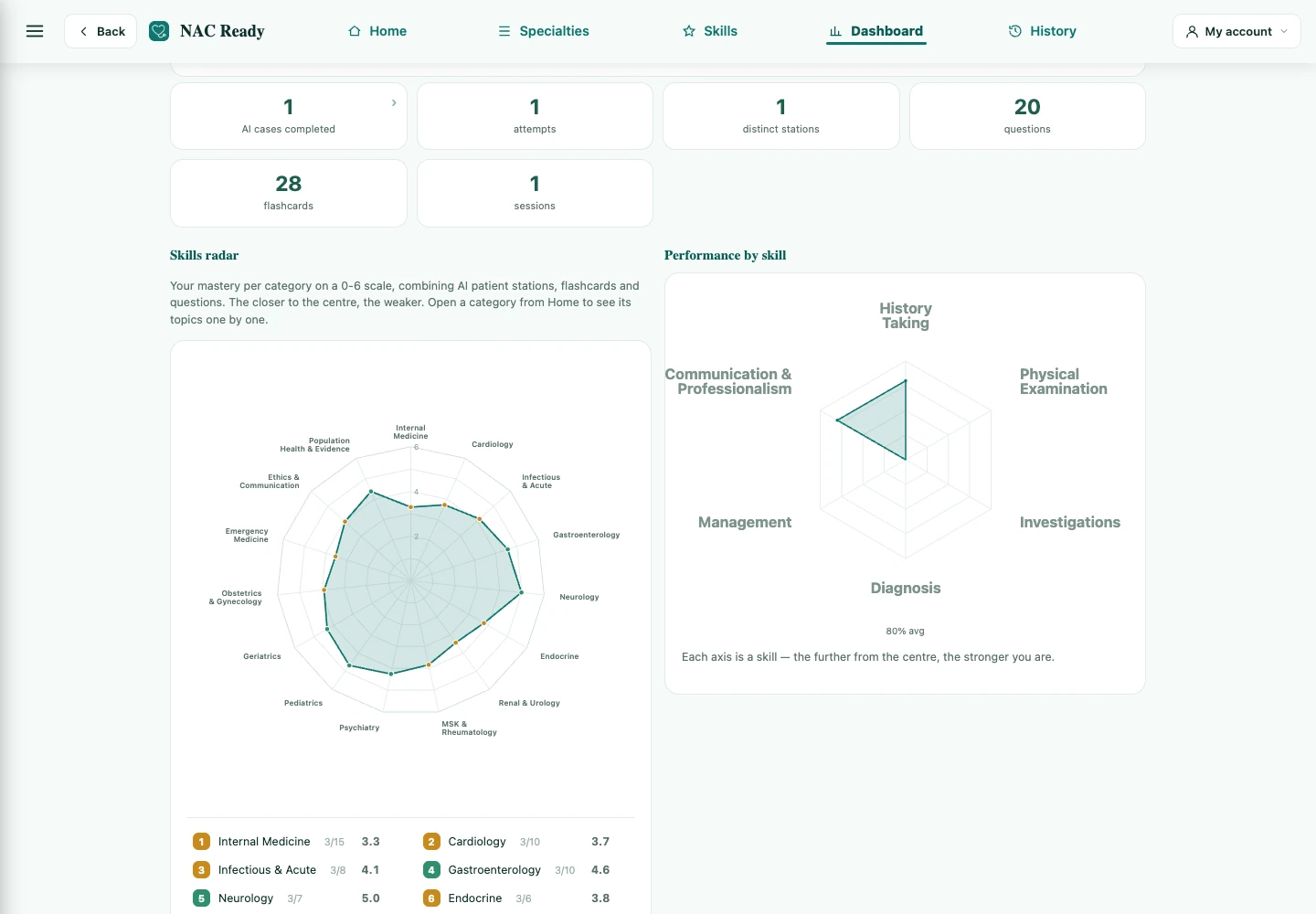
10 / Progress dashboard

Know where to go next.

Bring your questions, flashcards, mock tests and completed stations together. Review your activity, revisit past results and focus your next session on weaker areas.

  • Track clinical knowledge and practice skills.
  • Use confidence and past results to guide your review.
Current Dashboard showing practice activity, performance by skill and review tools with illustrative data.
Actual interface · illustrative practice data.Enlarge screenshot

Choose how you want to pay.

Both paid options include the same full access and 5 AI patients per day. Pay CAD $29.99 monthly, or save with CAD $240 annually (equivalent to CAD $20/month). Auto-renews; cancel anytime. Free study starts immediately with no card required.

Flexible

NAC Ready Monthly

CAD $29.99 / month
Full access · cancel anytime
  • 5 AI patient cases per day — every day
  • All 14 specialties & 150+ topics, 3 cases per topic
  • Rubric feedback & model consultations after every station
  • Flashcards & MCQ mock tests included
  • Progress dashboard & completed results in the app
  • New cases & features included
Choose monthly — CAD $29.99

Secure checkout with Stripe · auto-renews · cancel anytime.

Best value

NAC Ready Annual

CAD $240 / year
Equivalent to CAD $20/month · cancel anytime
  • 5 AI patient cases per day — every day
  • All 14 specialties & 150+ topics, 3 cases per topic
  • Rubric feedback & model consultations after every station
  • Flashcards & MCQ mock tests included
  • Progress dashboard & completed results in the app
  • Save CAD $119.88 per year compared with monthly billing
Choose annual — CAD $240

Secure checkout with Stripe · auto-renews · cancel anytime.

Free

$0
Daily study, no card required
  • 20 Questions + 20 Flashcards daily
  • 20 Skill Questions + 20 Skill Flashcards daily
  • Up to 3 Free AI patients, 1/day, subject to capacity
  • No credit card required.
Start free →

Frequently asked questions

What is the NAC OSCE?

The National Assessment Collaboration OSCE is a Canadian clinical-skills exam from the Medical Council of Canada, required for international medical graduates pursuing residency in Canada. It tests history-taking, physical exam, counselling and clinical reasoning across standardized-patient stations.

Can I practise without a study partner?

Yes. The AI patient lets you rehearse a simulated encounter on your own, by voice or text. Read the candidate instructions, practise the conversation and review your feedback after finishing. Use it alongside your classes and practice with other people.

Do I need to download anything?

No — NAC Ready runs entirely in your web browser. Just sign in and start practicing.

How does billing work?

Choose CAD $29.99 per month or CAD $240 per year (equivalent to CAD $20/month). Both include the same full access and up to 5 AI patient cases per day. Subscriptions renew automatically and can be changed or cancelled through your account.

Is the feedback reliable?

It's AI-generated guidance to help you practice deliberately — strengths, gaps, priorities and a model approach. It's a study aid, not an official MCC score.

Make room for your next NAC practice.

Create your free account and explore the stations. Free includes up to 3 AI patients — 1 per day, subject to capacity — plus daily study pools. No card required.

Start practicing free →